
How to Manage Users on a 2GIG Go!Control2 (GC2) Alarm System

Managing User Codes on a 2GIG GoControl2 Alarm System

In the world we live in, where security is of utmost importance, the 2GIG Go!Control2 (GC2) alarm panel offers reliable features that guarantee the safety of both residential and commercial properties. The management of user codes is one of its key strengths, providing controlled access and monitoring. This guide will illustrate the effective management of user codes.

Only the person with the Master User Code can add or change the other User Codes.

To setup the User Codes, use the following steps:

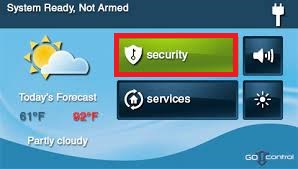
  1. On the Home Screen, press SECURITY.

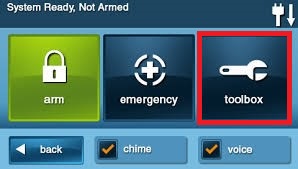
2. On the Security Screen, press TOOLBOX.

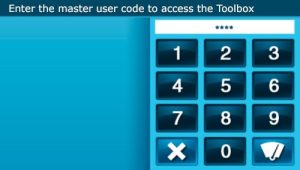
3. Enter the Master User Code (the default master code is 1111).

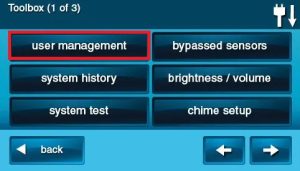
4. On the Toolbox Screen, press USER MANAGEMENT.

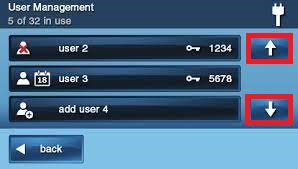
5. Use the Up and Down arrows to scroll through the list.

Adding a User Code

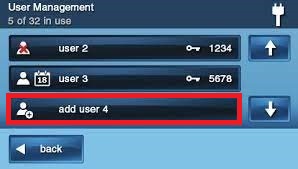
1. Press one of the ADD USER buttons or select an existing user from the list.

2. Enter a four-digit code for the new User Code and press OK.

3. Enter the Code again to confirm the code and press OK.

4. A confirmation screen will display, press OK.

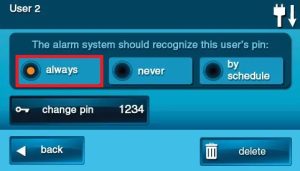
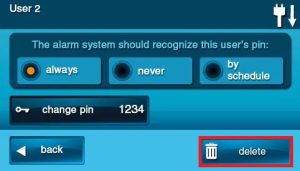
The User Code Access Option Screen will be displayed. The three options determine when this User Code is valid.

Select one of the three options: ALWAYS, NEVER, or BY SCHEDULE.

    • Select ALWAYS to set this User Code to always be valid.
    • Select NEVER to set this User Code to never be valid (disabling a user vs deleting a user).
    • Select BY SCHEDULE set this User Code to be valid only for selected days and times.

5. Press BACK.

Changing a User Code

Using the same process as before navigate to the USER MANAGEMENT location.

1. Select an existing user from the list.

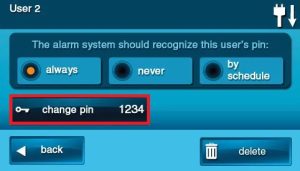
2. Click CHANGE PIN

3. Enter a four-digit code for the new User Code and press OK.

4. Enter the Code again to confirm the code and press OK.

5. Press BACK.

Deleting a User Code

Using the same process as before navigate to the USER MANAGEMENT location.

1. Select an existing user from the list.

2. Click DELETE

Best Practices and Considerations

  • Regular Audits: Periodically review and update user codes to maintain security.
  • Confidentiality: Keep user codes, especially the Master and Duress codes, confidential and known only to authorized individuals.
  • Documentation: Maintain a record of all user codes and their associated permissions for accountability.
Share the Post:

Related Posts

How to remotely manage your DVR / NVR via Mobile Device

Experience the freedom of monitoring your property from anywhere with the LTS Connect and Hik Connect Mobile Apps! Access live footage from your security cameras on your mobile device, whether you’re at work, on vacation, or out and about. Stay connected to your loved ones and your property—download the apps today and enhance your security!

Read More

How to Setup Email on Android – Edison Mail

Unlock the true potential of your email management with Edison Mail on your Android device! Say goodbye to cluttered inboxes and spam with confidence. This powerful email client features an intuitive interface and an impressive “one tap unsubscribe” option that simplifies subscription management like never before. Regardless of your tech expertise, setting up Edison Mail is a seamless process. Follow our straightforward step-by-step guide and reclaim control of your inbox now. Embrace a more organized digital life and wave farewell to unwanted emails!

Read More