No Dial Tone

No Dial Tone, Common Problems and Solutions

So you went to place a call and low and behold – nothing but dead air. Usually there is an easy solution to rectify the problem. Some common reasons you wont have a dial tone include:

  • Phone is not plugged in
  • Phone or Line Damaged
  • ATA not Registered
  • Billing / Payment Issue
  • No power to a Device
  • No Internet Connection

In order to fix this issue we recommend to check the following first:

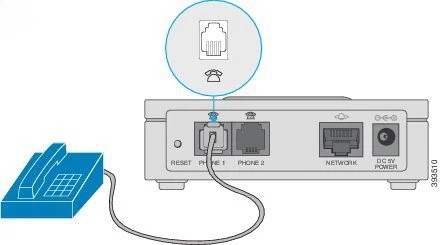
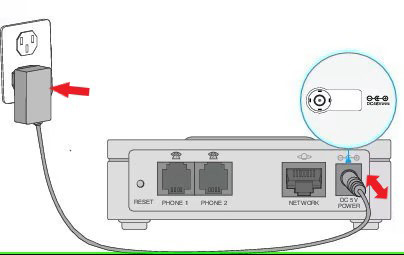
1. Is your Telephone plugged into the ATA?

Yes, you guessed it. Sometimes the simplest solution is the answer. Check to make sure that your Telephone is connected to the Phone 1, or Phone 2 port on the Analog Telephone Adapter (ATA). 
 

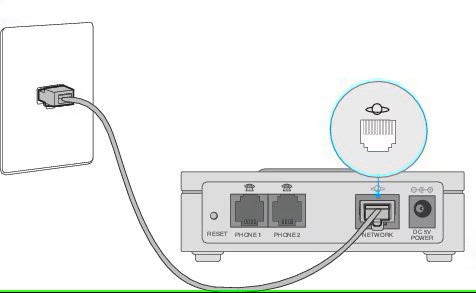
2. Is your ATA plugged into your Internet Connection?

Verify that the Internet port on the Analog Telephone Adapter (ATA) is plugged into your Internet connection. You should see a light on the ATA’s Internet Status Indicator (globe w/ ring).
 

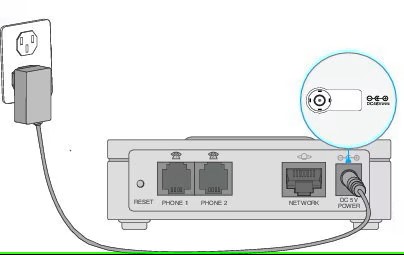
3. Does your ATA have Power?

Verify that the power supply is plugged into the Analog Telephone Adapter (ATA) and it’s power light is green (solid). 
 

4. Have you tried to reboot?

Unplug the power to the Analog Telephone Adapter (ATA) and wait 30 seconds. Verify the power light is not lit while you are waiting. After 30 seconds plug the ATA back in. You will see the power light come on and start to blink. Wait for the power light to turn green (solid). 
 

If problems persist, call CGI Technical Support at (520) 421-3333 opt 2

Share the Post:

Related Posts

Pros and Cons of Internet Cameras (Ring, Nest, Blink, etc)

In today’s smart technology era, home security has advanced with cloud cameras like Ring, Nest, and Blink. These devices offer enhanced security, easy installation, and smart home integration. However, they also come with drawbacks, including bandwidth usage, privacy concerns, and subscription costs. Are these cameras right for you? This blog explores the pros and cons of internet-based cameras to help you make informed decisions about your home security. Discover how these devices can enhance your safety and convenience!

Read More

How to Setup Email on Windows – Thunderbird

Are you ready to take control of your email with Thunderbird on your Windows device? This powerful, open-source application not only simplifies email management but also enhances your communication experience with its user-friendly interface and robust features. Whether you’re a seasoned user or new to email clients, our step-by-step guide will walk you through the installation and setup process effortlessly. Say goodbye to cluttered inboxes and hello to organized communication! Dive in to discover how to set up your email in just a few easy steps and unlock the full potential of Thunderbird today!

Read More

How to identify SPAM / Phishing Emails

Email is a vital communication tool, but it also serves as a prime target for cybercriminals. Phishing attacks can trick you into revealing sensitive information or clicking harmful links. To protect yourself, it’s crucial to recognize the warning signs of phishing emails. From urgent language and generic greetings to unexpected attachments and offers that seem too good to be true, understanding these red flags can help you stay safe. Discover the essential tips and best practices to identify and avoid phishing scams, ensuring your personal and professional information remains secure. Read on to learn more!

Read More